

How To Use AI In Your Garden (Simple, Practical Tips)
Smart technology is showing up everywhere — even in the garden. AI tools and apps can turn classic gardening routines into something easier (and often more fun). Whether you’re starting with a few herbs or you’ve built a backyard oasis, using AI in gardening can save time, help plants thrive, and boost your confidence as a grower.
I’ve already used AI in the garden for all sorts of practical things, like:
- Identifying plants and wildlife (plants, insects, visitors to the garden)
- Troubleshooting plant problems (yellow leaves, pests, watering issues)
- Understanding local conditions (soil type, sun, seasonal timing)
- Choosing what to plant (what suits your climate and your space)
- Planning improvements (soil upgrades, layout ideas, colour themes, ground covers)
- Finding local suppliers (where to buy, what to compare, best value)
And the best part: you don’t need to be an expert gardener (or a computer whiz). This guide shares simple ways to get started, plus a few helpful apps so you can see what’s possible straight away.
Identifying plants and wildlife in the garden
Did you know that simply snapping a photo on your smartphone and uploading it to your preferred AI assistant (ChatGPT, Copilot, Gemini, etc.) can open a whole world of helpful information about what’s living in your garden? Not only can it often identify plants and wildlife — it can also answer follow-up questions like “Is this native?” “Is it safe for pets?” “What does it eat?” “What should I do next?” That kind of insight, right at your fingertips, can make gardening feel much richer and more enjoyable.
For example, we noticed this little critter digging away one afternoon. At first it looked a bit like a rat, but it’s actually a very healthy, glossy quenda, native to the south-west of Western Australia. By uploading the photo to AI, we could confirm it wasn’t a quoll (as one family member suggested), and we learned more about this beautiful little marsupial.
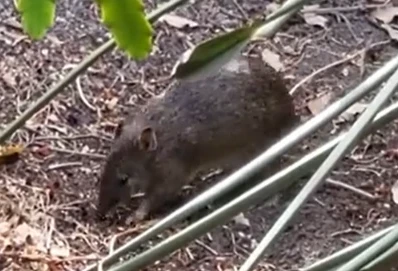
For day-to-day use, your go-to AI assistant can be surprisingly good at identifying plants, insects and wildlife. It’s not 100% accurate, but it usually points you in the right direction — and you can double-check with a specialist app if you want to be sure.
Cut / Paste Prompt:
“Please identify this [plant/creature] from my photo.
- Give your best guess and your confidence level (high/medium/low)
- List 2–3 lookalikes and how to tell them apart
- Tell me what it means for my garden and the best next step
My location: [city/region]. If you’re not confident, tell me what extra photo/angle would help.”
For more specialised resources, you may also enjoy some of the excellent apps available on Google Play or the Apple App Store. One lovely example for our part of the world is FrogID (Australian Museum): you record the frog call, and the app helps identify the frog from its croak. Another popular free option is iNaturalist, which can help identify both plants and animals.
Pest or plant problem diagnosis (gentle troubleshooting)
If something isn’t thriving, you can often get useful clues by uploading a couple of photos to your AI assistant and describing what’s been happening (sun, watering, recent weather). I’ve done this many times to narrow down likely causes and decide what to try first.
Cut/Paste Prompt:
“My plant is struggling. Here’s what I’m seeing: [yellow leaves / spots / holes / drooping / sticky residue] and it’s in [pot / garden bed].
Conditions: [full sun / part shade], watered [how often], recent weather [hot/cool/wet].
Please give me: (1) 3 likely causes (2) how to check which one it is (3) the gentlest first steps to fix it (start with the simplest/least toxic).”
If you’d like a dedicated plant-ID app, Pl@ntNet is a great free option for identifying plants from photos. Apps like Planta can also help with care routines and reminders (free to start, with optional paid features).
Gentle tip: ask for the “simplest, least-toxic first steps” before you consider stronger treatments.
For avid gardeners, you may also like a more comprehensive plant-care app (often subscription-based) that includes care reminders and help diagnosing common plant issues. Plantify is one example of this type of tool, and it can be handy if you want ongoing guidance rather than quick identification.
Understanding local conditions (soil type, sun, seasonal timing)
Different plants thrive in different conditions — soil type, sun exposure, rainfall, and seasonal timing all matter. A gentle way to improve your garden is to learn what you’re working with, and then choose plants that suit your area (instead of fighting the conditions in seasonal extremes).
AI can help you figure out:
- what your soil is likely to be (sandy/clay/loam) and how to improve it
- how much sun different areas of your garden receive (morning vs afternoon)
- what tends to grow well in your local climate and season
Cut/Paste Prompt:
“Based on my location [city/region], help me understand my garden conditions.
My garden spot gets [morning sun / afternoon sun / shade] and my soil seems [sandy/clay/unknown].
Please suggest: (1) what this means for plant choices (2) 3 simple ways to improve the soil (3) what to plant this season for best chances of success.”
Smarter watering (optional)
AI can also help you optimise water use by focusing on when and how much to water, rather than watering “just in case.”
- Smart watering controllers (often app-based) can adjust watering schedules using local weather data.
- Soil moisture sensors can help you see when the root zone is actually dry, so you water only when needed.
Gentle note: product names and features change over time — it’s fine to choose any reputable option that works with your existing irrigation setup and has clear reviews.
Choosing what to plant (what suits your climate and your space)
For years I struggled with one part of our backyard that baked in summer. No matter how often I watered, anything I planted there (herbs, flowers — you name it) would fail through the December–March heat.
That changed when I started asking AI about the few plants that were thriving and what else would suit the same conditions. Now that area is full of hardy, colourful succulents and it’s so much nicer to look at.

Now, the succulents in place are colourful and hardy, and the area is much nicer to look out upon!
Cut / Paste Prompt:
“I want to plant [herbs/flowers/vegetables/natives/low-maintenance plants].
My spot gets [morning sun / afternoon sun / shade], soil is [sandy/clay/unknown], and I can water [often/occasionally].
I’m in [city/region].
Please suggest 3–5 great plant choices, explain why they suit my conditions, and list any watch-outs (heat, frost, pests).
Then give me a simple starter plan for this weekend.”
You may also like an app such as Planter or Garden Planner which use AI to recommend the best positions and combinations for your vegetables, plants and flowers, taking things like sunlight, spacing and seasonal trends into account.
Planning improvements (soil upgrades, layout ideas, colour themes, ground covers)
Another area where AI can really help is brainstorming improvement ideas and turning them into an actionable plan. This can be just the nudge you need to get started and move toward a garden space you’ll love.
Cut/Paste Prompt (Soil upgrade)
“I want to improve my soil for [veg garden / flowers / natives / lawn].
My soil seems [sandy/clay/compacted/poor drainage] and the area is [full sun/part shade].
Please give me a simple 4-step plan using common materials (compost, mulch, gypsum, etc.), and tell me what to do this weekend vs what can wait.”
Cut/Paste Prompt (Layout ideas)
“I want to refresh my garden area: [front/back/side]. My style: [calm cottage / modern low-maintenance / native / Mediterranean].
Goals: [more shade/privacy / colour / less water / kid/pet friendly].
Constraints: budget [$], time [low/medium], and maintenance [low].
Please suggest 3 layout ideas and a short list of plants/materials that would suit [my region].”
Finding local suppliers (where to buy, what to compare, best value)
AI can also save time when you’re sourcing materials. It can help you compare options, estimate quantities, and find likely suppliers nearby—without driving from shop to shop.
Cut/Paste Prompt
“I’m in [suburb/city] and I need [item] for my garden (e.g., compost, mulch, potting mix, seedlings, pavers, edging).
Please suggest 3–5 local places to check (nurseries, landscape suppliers, hardware), what to ask for, and how to compare value (price per bag/m³, delivery costs, quality).
Also suggest a reasonable quantity estimate for an area of [approx size].”
Tip: stock levels and opening hours aren’t always up to date online, so it can pay to call ahead to confirm availability.
Next Steps: Start Small and Experiment
You don’t need to overhaul your whole yard. Pick one plant, one area, or one gardening problem and take one small action today. A blend of classic gardening and gentle AI support can make time outside more rewarding — with less guesswork and more fun. Happy growing!